MSExchangeOnline#
README
Microsoft Exchange Online Responder#
Removes a malicious Exchange Online inbox rule (for example an external auto-forward set up after a mailbox compromise) via the Microsoft Graph API. Complements the MSExchangeOnline_GetInboxRules analyzer, which identifies suspicious rules and their rule IDs.
Requires a Microsoft Entra ID app registration (client ID + secret) with admin-consented application permissions.
MSExchangeOnline_RemoveInboxRule#
Deletes a specific inbox (message) rule from a user's mailbox.
Graph endpoints#
GET /users/{id}/mailFolders/inbox/messageRules/{ruleId}— fetch the rule name, detect already-removed rulesDELETE /users/{id}/mailFolders/inbox/messageRules/{ruleId}
Behavior#
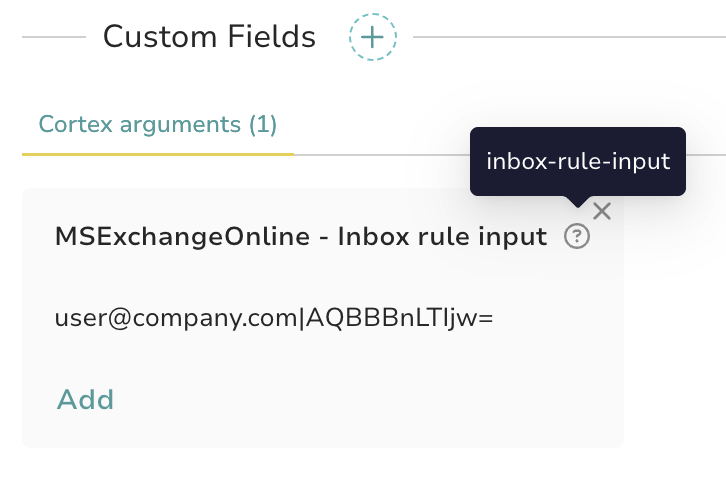
Runs on thehive:case. The target is read from a case custom field (name set by the custom_field_name config item, defaults to inbox-rule-input), formatted as:
<mailboxUPN>|<ruleId>
Example: usere@examcompanyple.com|AQAAAJ5dZp8=
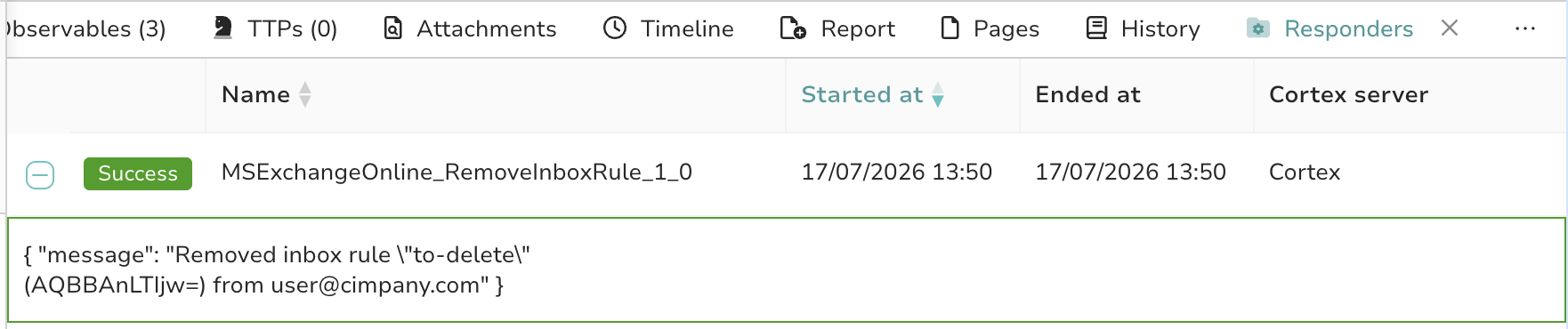
The rule ID comes from the GetInboxRules analyzer report. If the rule no longer exists (HTTP 404), the responder reports it as already removed instead of failing. On success, it adds the tag MSExchangeOnline:RuleRemoved:<upn>:<rule_name> to the case.
Setup in TheHive#
Create a case custom field named inbox-rule-input (type: string) in TheHive's admin settings, and fill it before running the responder on the case. If you use a different field name, set the custom_field_name configuration item to match.
Report example#
Setup: Create the Entra ID Credentials#
Follow the same steps as the analyzer (full guide here): app registration, client secret, then grant the following application permissions with admin consent:
| Permission | Type | Why |
|---|---|---|
MailboxSettings.ReadWrite |
Application | Read and delete inbox message rules |
User.Read.All |
Application | Resolve the mailbox UPN to the user object ID |
MailboxSettings.ReadWrite includes read access, so a single app registration with this permission (plus User.Read.All) can serve both the analyzer and this responder.
Feel free to restrict the app to the mailboxes it needs with an Exchange Online application access policy if needed.
Configuration#
tenant_id: Microsoft Entra ID Tenant IDclient_id: Application (client) ID of your Entra ID app registrationclient_secret: Client secret generated for that appcustom_field_name(optional): Name of the case custom field holding<mailboxUPN>|<ruleId>. Defaults toinbox-rule-input.
References#
MSExchangeOnline_RemoveInboxRule#
Author: Fabien Bloume, StrangeBee
License: AGPL-V3
Version: 1.0
Supported data types:
- thehive:case
Registration required: True
Subscription required: True
Free subscription: False
Third party service: https://learn.microsoft.com/en-us/graph/api/messagerule-delete
Description#
Removes a malicious Exchange Online inbox rule via Microsoft Graph. Reads the target mailbox UPN and Graph rule ID from a case custom field (name configurable, defaults to "inbox-rule-input"), formatted as "
Configuration#
| tenant_id | Microsoft Entra ID Tenant ID |
|---|---|
| Default value if not configured | N/A |
| Type of the configuration item | string |
| The configuration item can contain multiple values | False |
| Is required | True |
| client_id | Client ID/Application ID of Microsoft Entra ID Registered App (requires MailboxSettings.ReadWrite and User.Read.All application permissions) |
|---|---|
| Default value if not configured | N/A |
| Type of the configuration item | string |
| The configuration item can contain multiple values | False |
| Is required | True |
| client_secret | Secret for Microsoft Entra ID Registered Application |
|---|---|
| Default value if not configured | N/A |
| Type of the configuration item | string |
| The configuration item can contain multiple values | False |
| Is required | True |
| custom_field_name | Name of the case custom field holding the target mailbox UPN and Graph rule ID, formatted as " |
|---|---|
| Default value if not configured | inbox-rule-input |
| Type of the configuration item | string |
| The configuration item can contain multiple values | False |
| Is required | False |