Skip to content

AnyRun#

README

ANY.RUN logo


ANY.RUN Analyzers#

Table of Contents#

ANY.RUN Sandbox Analyzers#

Introduction#

ANY.RUN's Interactive Sandbox is a cloud-based service that provides SOC teams with a simple way to analyze cyber threats, enabling rapid threat intelligence and deep analysis in a secure environment.

The connector for the Interactive Sandbox enables TheHive users to quickly analyze and identify observables, such as artifacts and URLs in the cloud sandbox.

  • Perform real-time analysis to make fast decisions
  • Get detailed reports that include insights into network activity, dropped files, and MITRE ATT&CK techniques
  • Enrich observables in TheHive

As a result of the integration of ANY.RUN’s Interactive Sandbox with TheHive, you’ll achieve:

  • Streamlined Triage and Detection: Automate threat analysis to receive actionable verdicts and reports to prioritize incidents effectively.
  • Shorter MTTD and MTTR: Lower response times by gaining a full understanding of the threat’s behavior in seconds.
  • Higher Detection Rates: In-depth insights and advanced detection mechanisms provide deep visibility into complex threats.
  • Minimized Workload: Reduce analyst workload by automating repetitive tasks.
  • Stronger Security: Use sandbox reports and related data to refine rules, update playbooks, and train threat detection models.

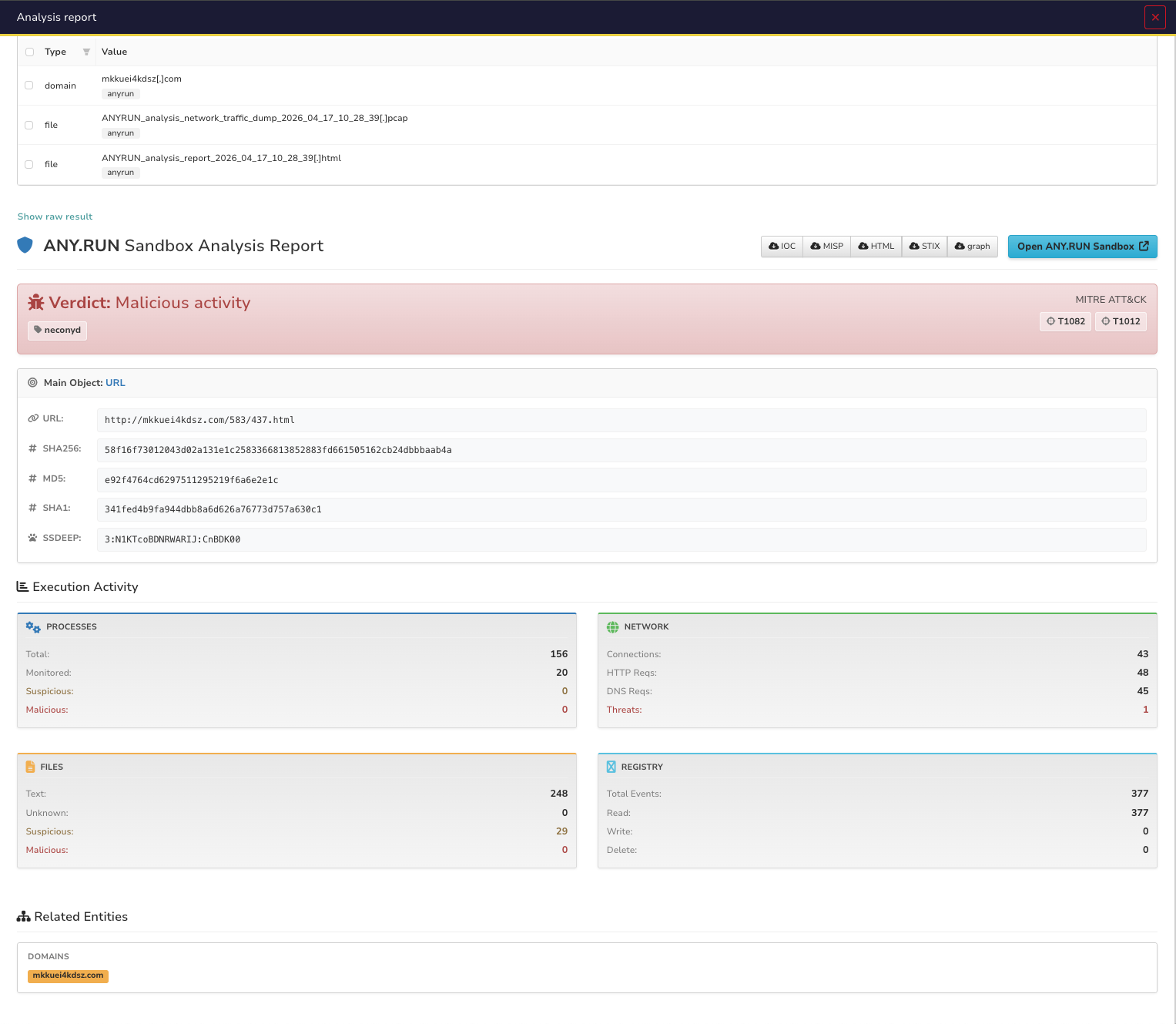
Report example: img.png

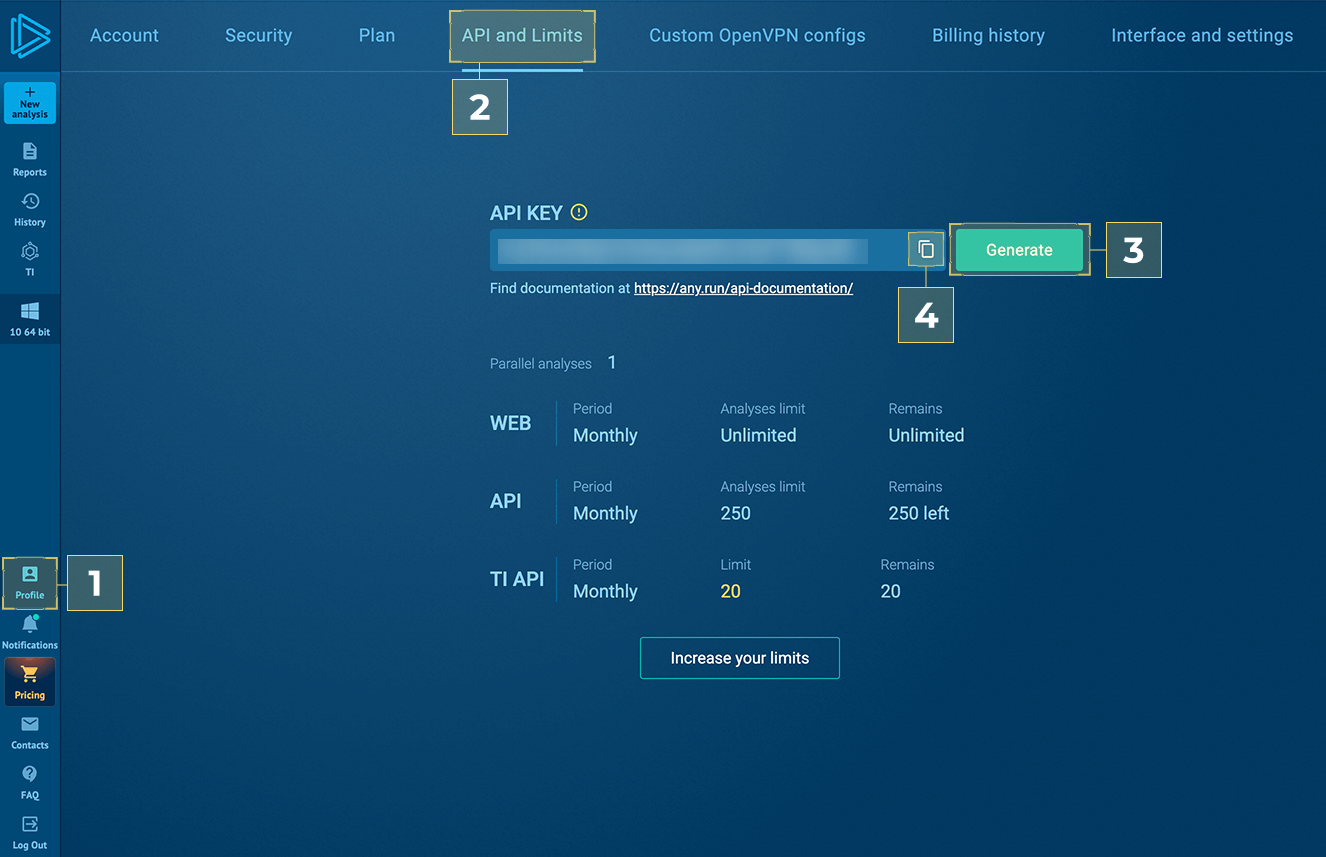
Generate API-KEY#

To use this integration, make sure that you have an active ANY.RUN Sandbox license.

Configuration parameters#

There are a number of configuration options, which are set either in Cortex UI.

Base ANY.RUN parameters#

Parameter Mandatory Description
api_key Yes ANY.RUN Sandbox API-KEY. See "Generate API-KEY" section in the README file.
verify_ssl Yes Enable SSL verification option.
get_html_report Yes Attach HTML report to the case as observable.
get_network_traffic_dump Yes Attach PCAP file to the case as observable.
get_iocs Yes Attach Analysis IOCs to the case as observables.
extract_malicious_iocs Yes When enabled, extracts only Suspicious and Malicious IOCs. When disabled, extracts all IOCs.

ANY.RUN environment parameters#

Parameter Mandatory Description
opt_timeout No Select analysis completion time. Size range: 10-660 seconds.
opt_network_connect No Enable network connection.
opt_network_fakenet No Enable FakeNet feature.
opt_network_tor No Enable TOR using.
opt_network_geo No TOR geolocation option. Example: US, AU
opt_network_mitm No Enable HTTPS MITM Proxy using.
opt_network_residential_proxy No Residential proxy using.
opt_network_residential_proxy_geo No Residential proxy geolocation option. Example: US, AU.
opt_privacy_type No Privacy settings. Supports: public, bylink, owner, byteam.
opt_auto_delete_after No Specify after what period of time this report should be deleted. Supports: day, week, 2 weeks, month. Leave blank for the task's infinite lifetime.
obj_ext_extension No Automatically change file extension to valid.
env_locale No Operation system's language. Use locale identifier or country name (Ex: "en-US" or "Brazil"). Case-insensitive.
user_tags No Append User Tags to new analysis. Only characters a-z, A-Z, 0-9, hyphen (-), and comma (,) are allowed. Max tag length - 16 characters. Max unique tags per analysis - 8.

ANY.RUN Windows specific environment parameters#

Parameter Mandatory Description
env_version No Version of OS. Supports: 7, 10, 11, server 2025
env_bitness No Bitness of Operation System. Supports 32, 64.
env_type No Environment preset type. You can select development env for OS Windows 10 x64. For all other cases, complete env is required.
obj_ext_startfolder No Supports: desktop, home, downloads, appdata, temp, windows, root.
obj_ext_cmd No Optional command-line arguments for the analyzed object. Use an empty string ("") to apply the default behavior.
obj_force_elevation No Forces the file to execute with elevated privileges and an elevated token (for PE32, PE32+, PE64 files only).
obj_ext_browser No Browser name. Supports: Google Chrome, Mozilla Firefox, Internet Explorer, Microsoft Edge.
auto_confirm_uac No Auto confirm Windows UAC requests.

ANY.RUN Linux specific environment parameters#

Parameter Mandatory Description
env_os No Operation System. Supports ubuntu, debian
obj_ext_startfolder No Start object from. Supports: desktop, home, downloads, temp.
obj_ext_cmd No Optional command-line arguments for the analyzed object. Use an empty string ("") to apply the default behavior.
run_as_root No Run file with superuser privileges.
obj_ext_browser No Browser name. Supports: Google Chrome, Mozilla Firefox.

ANY.RUN Android specific environment parameters#

Parameter Mandatory Description
obj_ext_cmd No Optional command-line arguments for the analyzed object. Use an empty string ("") to apply the default behavior.

Data Flow#

graph LR
    subgraph TheHive Input
        URL[URL Observable]
        File[File Observable]
    end

    subgraph ANY.RUN Sandbox
        Task[Sandbox Analysis]
        Analysis[Behavioral Analysis]
    end

    subgraph TheHive Output
        Verdict[Analysis verdict]
        MainObject[MainObject]
        AnalysisURL[Interactive analysis URL]
        Reports[Link to the IOC/MISP/STIX/HTML/graph reports]
        Indicators[Related Domain/IPs/URLs]
        Tags[Analysis tags]
        Counters[Analysis statistic]
        Mitre[MITRE ATT&CK techniques]
    end

    URL --> Task
    File --> Task
    Task --> Analysis
    Analysis --> MainObject
    Analysis --> AnalysisURL
    Analysis --> Reports
    Analysis --> Indicators
    Analysis --> Tags
    Analysis --> Counters
    Analysis --> Mitre

Additional information#

  • Analysis Time: Sandbox analysis typically takes 1-3 minutes depending on the sample
  • Task Timer: Configure anyrun_opt_timeout based on expected analysis time
  • Privacy Settings: Use bylink or team for sensitive samples
  • API Access Required: Available on ANY.RUN plans with API access, including trial
  • Rate Limits: API calls are subject to ANY.RUN rate limits based on subscription tier

ANY.RUN TI Lookup Analyzer#

Introduction#

ANY.RUN’s Threat Intelligence Lookup (TI Lookup) is a service that allows you to browse IOCs and related threat data to simplify and enrich cyberattack investigations.

The Threat Intelligence Lookup сonnector enables TheHive users to browse various types of IOCs, from IPs and domains to URLs and hashes.

  • Browse indicators in TI Lookup without leaving TheHive
  • Receive data related to your query to gain actionable insights
  • Use them for incident response, to create new rules, train models, update playbooks, etc.

As a result of integration of TI Lookup with TheHive, you’ll achieve:

  • Early Threat Detection: Correlate IOCs to identify incidents before they escalate.
  • Proactive Defense Enrichment: Collect indicators from attacks on other companies to update your detection systems.
  • Reduced MTTR and Increased Detection Rate: Access to rich threat context enables SOCs to make informed decisions fast.

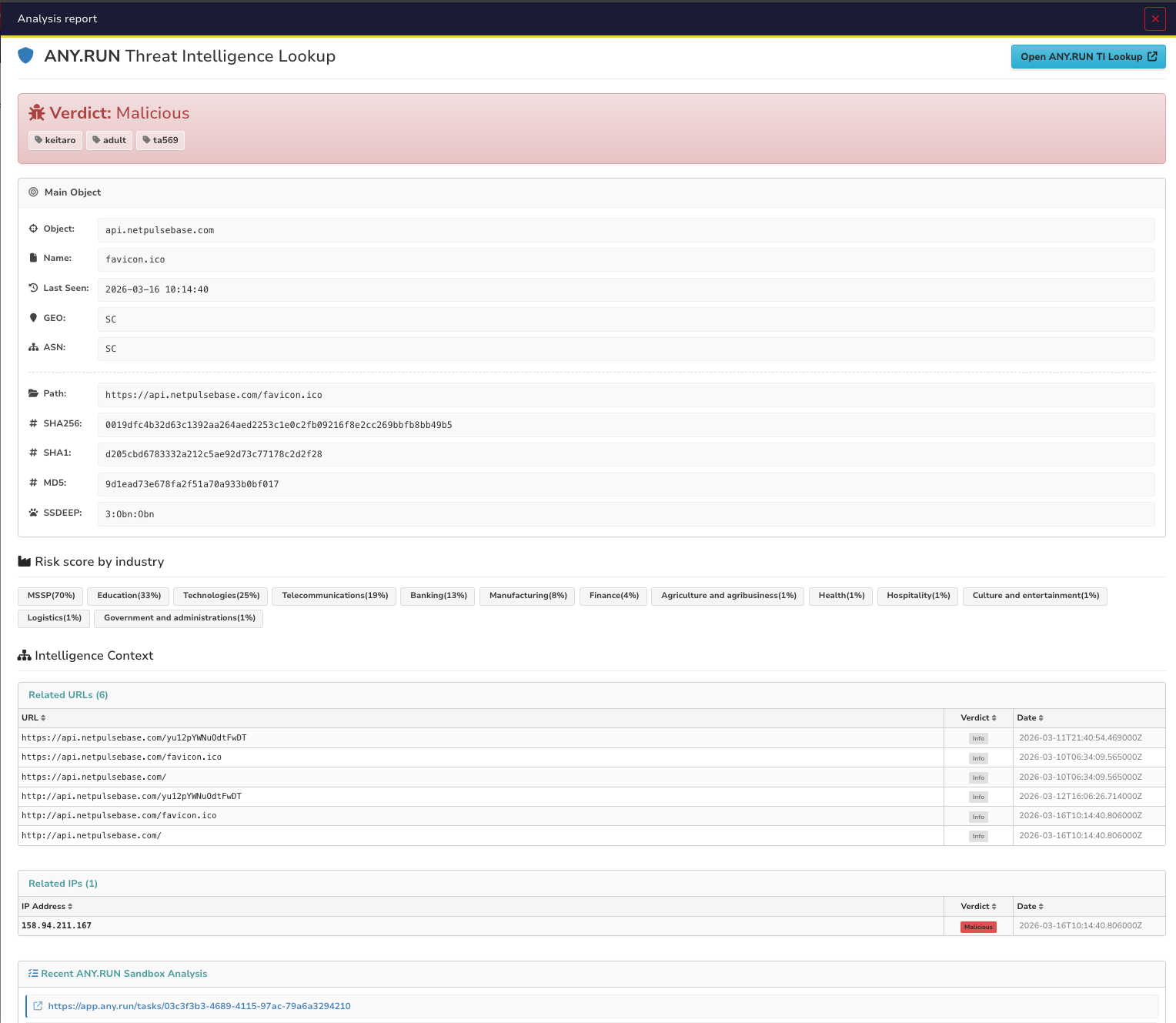
Report example: img.png

Generate API-KEY#

To use this integration, make sure that you have an active ANY.RUN Sandbox license.

Configuration parameters#

There are a number of configuration options, which are set either in Cortex UI.

Base ANY.RUN parameters#

Parameter Mandatory Description
api_key Yes ANY.RUN Sandbox API-KEY. See "Generate API-KEY" section in the README file.
verify_ssl Yes Enable SSL verification option.
get_iocs Yes Attach Analysis IOCs to the case as observables.
extract_malicious_iocs Yes When enabled, extracts only Suspicious and Malicious IOCs. When disabled, extracts all IOCs.

ANY.RUN environment parameters#

Parameter Mandatory Description
lookup_depth No Specify the number of days from the current date for which you want to lookup.

Data Flow#

graph LR
    subgraph TheHive Input
        Hash[Hash Observable]
        Domain[Domain Observable]
        IP[IP Observable]
        Url[Url Observable]

    end

    subgraph ANY.RUN TI Lookup
        Intelligence[Threat Intelligence]
    end

    subgraph OpenCTI Output
        ThreatLevel[Object ThreatLevel]
        LookupURL[TI Lookup URL]
        LastSeen[Object last seen]
        Industries[Object related industries]
        Tags[Object related tags]
        ASN[Object autonomous system owner]
        GEO[Object geo country]
        Indicators[Object related Domain/IPs/URLs/Files]
        Tasks[Object related analyses]
        FileMeta[Object related file meta data]
    end

    Hash --> Intelligence
    Domain --> Intelligence
    IP --> Intelligence
    Url --> Intelligence
    Intelligence --> ThreatLevel
    Intelligence --> LookupURL
    Intelligence --> LastSeen
    Intelligence --> Industries
    Intelligence --> Tags
    Intelligence --> ASN
    Intelligence --> GEO
    Intelligence --> Indicators
    Intelligence --> Tasks
    Intelligence --> FileMeta

Additional information#

  • API Access Required: Available on ANY.RUN plans with API access, including trial
  • Rate Limits: API calls are subject to ANY.RUN rate limits based on subscription tier

Support#

This is an ANY.RUN’s supported connector. You can write to us for help with integration via techsupport@any.run . Contact us for a quote or demo via this form.

AnyRun_Sandbox_URL_Android#

Author: ANY.RUN Integrations Team
License: AGPL-V3
Version: 1.0
Supported observables types:
- url
Registration required: True
Subscription required: True
Free subscription: False
Third party service: https://any.run/

Description#

Run URL analysis using Android VM

Configuration#

api_key ANY.RUN Sandbox API key
Default value if not configured N/A
Type of the configuration item string
The configuration item can contain multiple values False
Is required True
verify_ssl Verify SSL certificate
Default value if not configured True
Type of the configuration item boolean
The configuration item can contain multiple values False
Is required True
get_html_report Attach HTML report to the case as observable
Default value if not configured True
Type of the configuration item boolean
The configuration item can contain multiple values False
Is required True
get_network_traffic_dump Attach PCAP file to the case as observable
Default value if not configured True
Type of the configuration item boolean
The configuration item can contain multiple values False
Is required True
get_iocs Attach Analysis IOCs to the case as observables
Default value if not configured True
Type of the configuration item boolean
The configuration item can contain multiple values False
Is required True
extract_malicious_iocs When enabled, extracts only Suspicious and Malicious IOCs. When disabled, extracts all IOCs
Default value if not configured True
Type of the configuration item boolean
The configuration item can contain multiple values False
Is required True
obj_url Target URL. Size range 5-512. Example -> (http/https)://(your-link)
Default value if not configured N/A
Type of the configuration item string
The configuration item can contain multiple values False
Is required False
env_locale Operation System language. Use locale identifier or country name Example - ( "en-US" or "Brazil"). Case insensitive
Default value if not configured en-US
Type of the configuration item string
The configuration item can contain multiple values False
Is required False
opt_network_connect Network connection state
Default value if not configured True
Type of the configuration item boolean
The configuration item can contain multiple values False
Is required False
opt_network_fakenet FakeNet feature status
Default value if not configured False
Type of the configuration item boolean
The configuration item can contain multiple values False
Is required False
opt_network_tor TOR using
Default value if not configured False
Type of the configuration item boolean
The configuration item can contain multiple values False
Is required False
opt_network_geo TOR geo location option
Default value if not configured fastest
Type of the configuration item string
The configuration item can contain multiple values False
Is required False
opt_network_mitm HTTPS MITM proxy option
Default value if not configured False
Type of the configuration item boolean
The configuration item can contain multiple values False
Is required False
opt_network_residential_proxy Residential Proxy option
Default value if not configured False
Type of the configuration item boolean
The configuration item can contain multiple values False
Is required False
opt_network_residential_proxy_geo Residential Proxy Geo option
Default value if not configured fastest
Type of the configuration item string
The configuration item can contain multiple values False
Is required False
opt_privacy_type Privacy settings. Supports: public, bylink, owner, byteam
Default value if not configured bylink
Type of the configuration item string
The configuration item can contain multiple values False
Is required False
opt_timeout Timeout option, size range 10-660
Default value if not configured 120
Type of the configuration item number
The configuration item can contain multiple values False
Is required False
opt_auto_delete_after Specify after what period of time this report should be deleted. Supports: day, week, 2 weeks, month. Leave blank for the task's infinite lifetime
Default value if not configured N/A
Type of the configuration item string
The configuration item can contain multiple values False
Is required False
user_tags Append User Tags to new analysis. Only characters a-z, A-Z, 0-9, hyphen (-), and comma (,) are allowed. Max tag length - 16 characters. Max unique tags per analysis - 8
Default value if not configured N/A
Type of the configuration item string
The configuration item can contain multiple values False
Is required False

Templates samples for TheHive#

AnyRun_Sandbox_File_Windows#

Author: ANY.RUN Integrations Team
License: AGPL-V3
Version: 1.0
Supported observables types:
- file
Registration required: True
Subscription required: True
Free subscription: False
Third party service: https://any.run/

Description#

Run File analysis using Windows VM

Configuration#

api_key ANY.RUN Sandbox API key
Default value if not configured N/A
Type of the configuration item string
The configuration item can contain multiple values False
Is required True
verify_ssl Verify SSL certificate
Default value if not configured True
Type of the configuration item boolean
The configuration item can contain multiple values False
Is required True
get_html_report Attach HTML report to the case as observable
Default value if not configured True
Type of the configuration item boolean
The configuration item can contain multiple values False
Is required True
get_network_traffic_dump Attach PCAP file to the case as observable
Default value if not configured True
Type of the configuration item boolean
The configuration item can contain multiple values False
Is required True
get_iocs Attach Analysis IOCs to the case as observables
Default value if not configured True
Type of the configuration item boolean
The configuration item can contain multiple values False
Is required True
extract_malicious_iocs When enabled, extracts only Suspicious and Malicious IOCs. When disabled, extracts all IOCs
Default value if not configured True
Type of the configuration item boolean
The configuration item can contain multiple values False
Is required True
env_version Version of OS. Supports: 7, 10, 11, server 2025
Default value if not configured 10
Type of the configuration item string
The configuration item can contain multiple values False
Is required False
env_bitness Bitness of Operation System. Supports 32, 64 for Windows. 64 for Windows Server 2025
Default value if not configured 64
Type of the configuration item number
The configuration item can contain multiple values False
Is required False
env_type Environment preset type. You can select development env for OS Windows 10 x64. For all other cases, complete env is required
Default value if not configured complete
Type of the configuration item string
The configuration item can contain multiple values False
Is required False
env_locale Operation System language. Use locale identifier or country name Example - ( "en-US" or "Brazil"). Case insensitive
Default value if not configured en-US
Type of the configuration item string
The configuration item can contain multiple values False
Is required False
opt_network_connect Network connection state
Default value if not configured True
Type of the configuration item boolean
The configuration item can contain multiple values False
Is required False
opt_network_fakenet FakeNet feature status
Default value if not configured False
Type of the configuration item boolean
The configuration item can contain multiple values False
Is required False
opt_network_tor TOR using
Default value if not configured False
Type of the configuration item boolean
The configuration item can contain multiple values False
Is required False
opt_network_geo TOR geo location option
Default value if not configured fastest
Type of the configuration item string
The configuration item can contain multiple values False
Is required False
opt_network_mitm HTTPS MITM proxy option
Default value if not configured False
Type of the configuration item boolean
The configuration item can contain multiple values False
Is required False
opt_network_residential_proxy Residential Proxy option
Default value if not configured False
Type of the configuration item boolean
The configuration item can contain multiple values False
Is required False
opt_network_residential_proxy_geo Residential Proxy Geo option
Default value if not configured fastest
Type of the configuration item string
The configuration item can contain multiple values False
Is required False
opt_privacy_type Privacy settings. Supports: public, bylink, owner, byteam
Default value if not configured bylink
Type of the configuration item string
The configuration item can contain multiple values False
Is required False
opt_timeout Timeout option, size range 10-660
Default value if not configured 240
Type of the configuration item number
The configuration item can contain multiple values False
Is required False
opt_auto_delete_after Specify after what period of time this report should be deleted. Supports: day, week, 2 weeks, month. Leave blank for the task's infinite lifetime
Default value if not configured N/A
Type of the configuration item string
The configuration item can contain multiple values False
Is required False
obj_ext_extension Automatically change extension to valid
Default value if not configured True
Type of the configuration item boolean
The configuration item can contain multiple values False
Is required False
obj_ext_cmd Optional command line
Default value if not configured __
Type of the configuration item string
The configuration item can contain multiple values False
Is required False
obj_ext_startfolder Start object from. Supports: desktop, home, downloads, appdata, temp, windows, root
Default value if not configured temp
Type of the configuration item string
The configuration item can contain multiple values False
Is required False
obj_force_elevation Forces the file to execute with elevated privileges and an elevated token (for PE32, PE32+, PE64 files only)
Default value if not configured True
Type of the configuration item boolean
The configuration item can contain multiple values False
Is required False
auto_confirm_uac Auto confirm Windows UAC requests
Default value if not configured True
Type of the configuration item boolean
The configuration item can contain multiple values False
Is required False
user_tags Append User Tags to new analysis. Only characters a-z, A-Z, 0-9, hyphen (-), and comma (,) are allowed. Max tag length - 16 characters. Max unique tags per analysis - 8
Default value if not configured N/A
Type of the configuration item string
The configuration item can contain multiple values False
Is required False

Templates samples for TheHive#

AnyRun_Sandbox_File_Android#

Author: ANY.RUN Integrations Team
License: AGPL-V3
Version: 1.0
Supported observables types:
- file
Registration required: True
Subscription required: True
Free subscription: False
Third party service: https://any.run/

Description#

Run File analysis using Android VM

Configuration#

api_key ANY.RUN Sandbox API key
Default value if not configured N/A
Type of the configuration item string
The configuration item can contain multiple values False
Is required True
verify_ssl Verify SSL certificate
Default value if not configured True
Type of the configuration item boolean
The configuration item can contain multiple values False
Is required True
get_html_report Attach HTML report to the case as observable
Default value if not configured True
Type of the configuration item boolean
The configuration item can contain multiple values False
Is required True
get_iocs Attach Analysis IOCs to the case as observables
Default value if not configured True
Type of the configuration item boolean
The configuration item can contain multiple values False
Is required True
extract_malicious_iocs When enabled, extracts only Suspicious and Malicious IOCs. When disabled, extracts all IOCs
Default value if not configured True
Type of the configuration item boolean
The configuration item can contain multiple values False
Is required True
get_network_traffic_dump Attach PCAP file to the case as observable
Default value if not configured True
Type of the configuration item boolean
The configuration item can contain multiple values False
Is required True
env_locale Operation System language. Use locale identifier or country name Example - ( "en-US" or "Brazil"). Case insensitive
Default value if not configured en-US
Type of the configuration item string
The configuration item can contain multiple values False
Is required False
opt_network_connect Network connection state
Default value if not configured True
Type of the configuration item boolean
The configuration item can contain multiple values False
Is required False
opt_network_fakenet FakeNet feature status
Default value if not configured False
Type of the configuration item boolean
The configuration item can contain multiple values False
Is required False
opt_network_tor TOR using
Default value if not configured False
Type of the configuration item boolean
The configuration item can contain multiple values False
Is required False
opt_network_geo TOR geo location option
Default value if not configured fastest
Type of the configuration item string
The configuration item can contain multiple values False
Is required False
opt_network_mitm HTTPS MITM proxy option
Default value if not configured False
Type of the configuration item boolean
The configuration item can contain multiple values False
Is required False
opt_network_residential_proxy Residential Proxy option
Default value if not configured False
Type of the configuration item boolean
The configuration item can contain multiple values False
Is required False
opt_network_residential_proxy_geo Residential Proxy Geo option
Default value if not configured fastest
Type of the configuration item string
The configuration item can contain multiple values False
Is required False
opt_privacy_type Privacy settings. Supports: public, bylink, owner, byteam
Default value if not configured bylink
Type of the configuration item string
The configuration item can contain multiple values False
Is required False
opt_timeout Timeout option, size range 10-660
Default value if not configured 240
Type of the configuration item number
The configuration item can contain multiple values False
Is required False
opt_auto_delete_after Specify after what period of time this report should be deleted. Supports: day, week, 2 weeks, month. Leave blank for the task's infinite lifetime
Default value if not configured N/A
Type of the configuration item string
The configuration item can contain multiple values False
Is required False
obj_ext_cmd Optional command line
Default value if not configured __
Type of the configuration item string
The configuration item can contain multiple values False
Is required False
user_tags Append User Tags to new analysis. Only characters a-z, A-Z, 0-9, hyphen (-), and comma (,) are allowed. Max tag length - 16 characters. Max unique tags per analysis - 8
Default value if not configured N/A
Type of the configuration item string
The configuration item can contain multiple values False
Is required False

Templates samples for TheHive#

AnyRun_Sandbox_URL_Windows#

Author: ANY.RUN Integrations Team
License: AGPL-V3
Version: 1.0
Supported observables types:
- url
Registration required: True
Subscription required: True
Free subscription: False
Third party service: https://any.run/

Description#

Run URL analysis using Windows VM

Configuration#

api_key ANY.RUN Sandbox API key
Default value if not configured N/A
Type of the configuration item string
The configuration item can contain multiple values False
Is required True
verify_ssl Verify SSL certificate
Default value if not configured True
Type of the configuration item boolean
The configuration item can contain multiple values False
Is required True
get_html_report Attach HTML report to the case as observable
Default value if not configured True
Type of the configuration item boolean
The configuration item can contain multiple values False
Is required True
get_network_traffic_dump Attach PCAP file to the case as observable
Default value if not configured True
Type of the configuration item boolean
The configuration item can contain multiple values False
Is required True
get_iocs Attach Analysis IOCs to the case as observables
Default value if not configured True
Type of the configuration item boolean
The configuration item can contain multiple values False
Is required True
extract_malicious_iocs When enabled, extracts only Suspicious and Malicious IOCs. When disabled, extracts all IOCs
Default value if not configured True
Type of the configuration item boolean
The configuration item can contain multiple values False
Is required True
env_version Version of OS. Supports: 7, 10, 11, server 2025
Default value if not configured 10
Type of the configuration item string
The configuration item can contain multiple values False
Is required False
env_bitness Bitness of Operation System. Supports 32, 64 for Windows. 64 for Windows Server 2025
Default value if not configured 64
Type of the configuration item number
The configuration item can contain multiple values False
Is required False
env_type Environment preset type. You can select development env for OS Windows 10 x64. For all other cases, complete env is required
Default value if not configured complete
Type of the configuration item string
The configuration item can contain multiple values False
Is required False
env_locale Operation System language. Use locale identifier or country name Example - ( "en-US" or "Brazil"). Case insensitive
Default value if not configured en-US
Type of the configuration item string
The configuration item can contain multiple values False
Is required False
opt_network_connect Network connection state
Default value if not configured True
Type of the configuration item boolean
The configuration item can contain multiple values False
Is required False
opt_network_fakenet FakeNet feature status
Default value if not configured False
Type of the configuration item boolean
The configuration item can contain multiple values False
Is required False
opt_network_tor TOR using
Default value if not configured False
Type of the configuration item boolean
The configuration item can contain multiple values False
Is required False
opt_network_geo TOR geo location option
Default value if not configured fastest
Type of the configuration item string
The configuration item can contain multiple values False
Is required False
opt_network_mitm HTTPS MITM proxy option
Default value if not configured False
Type of the configuration item boolean
The configuration item can contain multiple values False
Is required False
opt_network_residential_proxy Residential Proxy option
Default value if not configured False
Type of the configuration item boolean
The configuration item can contain multiple values False
Is required False
opt_network_residential_proxy_geo Residential Proxy Geo option
Default value if not configured fastest
Type of the configuration item string
The configuration item can contain multiple values False
Is required False
opt_privacy_type Privacy settings. Supports: public, bylink, owner, byteam
Default value if not configured bylink
Type of the configuration item string
The configuration item can contain multiple values False
Is required False
opt_timeout Timeout option, size range 10-660
Default value if not configured 120
Type of the configuration item number
The configuration item can contain multiple values False
Is required False
opt_auto_delete_after Specify after what period of time this report should be deleted. Supports: day, week, 2 weeks, month. Leave blank for the task's infinite lifetime
Default value if not configured N/A
Type of the configuration item string
The configuration item can contain multiple values False
Is required False
obj_ext_browser Browser name. Supports Google Chrome, Mozilla Firefox, Internet Explorer, Microsoft Edge for Windows 7, 10, 11. Microsoft Edge for Windows Server 2025
Default value if not configured Microsoft Edge
Type of the configuration item string
The configuration item can contain multiple values False
Is required False
obj_ext_extension Automatically change extension to valid
Default value if not configured True
Type of the configuration item boolean
The configuration item can contain multiple values False
Is required False
user_tags Append User Tags to new analysis. Only characters a-z, A-Z, 0-9, hyphen (-), and comma (,) are allowed. Max tag length - 16 characters. Max unique tags per analysis - 8
Default value if not configured N/A
Type of the configuration item string
The configuration item can contain multiple values False
Is required False

Templates samples for TheHive#

AnyRun_Sandbox_File_Linux#

Author: ANY.RUN Integrations Team
License: AGPL-V3
Version: 1.0
Supported observables types:
- file
Registration required: True
Subscription required: True
Free subscription: False
Third party service: https://any.run/

Description#

Run File analysis using Linux VM

Configuration#

api_key ANY.RUN Sandbox API key
Default value if not configured N/A
Type of the configuration item string
The configuration item can contain multiple values False
Is required True
verify_ssl Verify SSL certificate
Default value if not configured True
Type of the configuration item boolean
The configuration item can contain multiple values False
Is required True
get_html_report Attach HTML report to the case as observable
Default value if not configured True
Type of the configuration item boolean
The configuration item can contain multiple values False
Is required True
get_iocs Attach Analysis IOCs to the case as observables
Default value if not configured True
Type of the configuration item boolean
The configuration item can contain multiple values False
Is required True
extract_malicious_iocs When enabled, extracts only Suspicious and Malicious IOCs. When disabled, extracts all IOCs
Default value if not configured True
Type of the configuration item boolean
The configuration item can contain multiple values False
Is required True
get_network_traffic_dump Attach PCAP file to the case as observable
Default value if not configured True
Type of the configuration item boolean
The configuration item can contain multiple values False
Is required True
env_os Operation System. Supports ubuntu, debian
Default value if not configured ubuntu
Type of the configuration item string
The configuration item can contain multiple values False
Is required False
env_locale Operation System language. Use locale identifier or country name Example - ( "en-US" or "Brazil"). Case insensitive
Default value if not configured en-US
Type of the configuration item string
The configuration item can contain multiple values False
Is required False
opt_network_connect Network connection state
Default value if not configured True
Type of the configuration item boolean
The configuration item can contain multiple values False
Is required False
opt_network_fakenet FakeNet feature status
Default value if not configured False
Type of the configuration item boolean
The configuration item can contain multiple values False
Is required False
opt_network_tor TOR using
Default value if not configured False
Type of the configuration item boolean
The configuration item can contain multiple values False
Is required False
opt_network_geo TOR geo location option
Default value if not configured fastest
Type of the configuration item string
The configuration item can contain multiple values False
Is required False
opt_network_mitm HTTPS MITM proxy option
Default value if not configured False
Type of the configuration item boolean
The configuration item can contain multiple values False
Is required False
opt_network_residential_proxy Residential Proxy option
Default value if not configured False
Type of the configuration item boolean
The configuration item can contain multiple values False
Is required False
opt_network_residential_proxy_geo Residential Proxy Geo option
Default value if not configured fastest
Type of the configuration item string
The configuration item can contain multiple values False
Is required False
opt_privacy_type Privacy settings. Supports: public, bylink, owner, byteam
Default value if not configured bylink
Type of the configuration item string
The configuration item can contain multiple values False
Is required False
opt_timeout Timeout option, size range 10-660
Default value if not configured 240
Type of the configuration item number
The configuration item can contain multiple values False
Is required False
opt_auto_delete_after Specify after what period of time this report should be deleted. Supports: day, week, 2 weeks, month. Leave blank for the task's infinite lifetime
Default value if not configured N/A
Type of the configuration item string
The configuration item can contain multiple values False
Is required False
obj_ext_extension Automatically change extension to valid
Default value if not configured True
Type of the configuration item boolean
The configuration item can contain multiple values False
Is required False
obj_ext_cmd Optional command line
Default value if not configured __
Type of the configuration item string
The configuration item can contain multiple values False
Is required False
obj_ext_startfolder Start object from. Supports: desktop, home, downloads, temp
Default value if not configured temp
Type of the configuration item string
The configuration item can contain multiple values False
Is required False
run_as_root Run file with superuser privileges
Default value if not configured True
Type of the configuration item boolean
The configuration item can contain multiple values False
Is required False
user_tags Append User Tags to new analysis. Only characters a-z, A-Z, 0-9, hyphen (-), and comma (,) are allowed. Max tag length - 16 characters. Max unique tags per analysis - 8
Default value if not configured N/A
Type of the configuration item string
The configuration item can contain multiple values False
Is required False

Templates samples for TheHive#

AnyRun_Sandbox_URL_Linux#

Author: ANY.RUN Integrations Team
License: AGPL-V3
Version: 1.0
Supported observables types:
- url
Registration required: True
Subscription required: True
Free subscription: False
Third party service: https://any.run/

Description#

Run URL analysis using Linux VM

Configuration#

api_key ANY.RUN Sandbox API key
Default value if not configured N/A
Type of the configuration item string
The configuration item can contain multiple values False
Is required True
verify_ssl Verify SSL certificate
Default value if not configured True
Type of the configuration item boolean
The configuration item can contain multiple values False
Is required True
get_html_report Attach HTML report to the case as observable
Default value if not configured True
Type of the configuration item boolean
The configuration item can contain multiple values False
Is required True
get_network_traffic_dump Attach PCAP file to the case as observable
Default value if not configured True
Type of the configuration item boolean
The configuration item can contain multiple values False
Is required True
get_iocs Attach Analysis IOCs to the case as observables
Default value if not configured True
Type of the configuration item boolean
The configuration item can contain multiple values False
Is required True
extract_malicious_iocs When enabled, extracts only Suspicious and Malicious IOCs. When disabled, extracts all IOCs
Default value if not configured True
Type of the configuration item boolean
The configuration item can contain multiple values False
Is required True
obj_url Target URL. Size range 5-512. Example -> (http/https)://(your-link)
Default value if not configured N/A
Type of the configuration item string
The configuration item can contain multiple values False
Is required False
env_os Operation System. Supports ubuntu, debian
Default value if not configured ubuntu
Type of the configuration item string
The configuration item can contain multiple values False
Is required False
env_locale Operation System language. Use locale identifier or country name Example - ( "en-US" or "Brazil"). Case insensitive
Default value if not configured en-US
Type of the configuration item string
The configuration item can contain multiple values False
Is required False
opt_network_connect Network connection state
Default value if not configured True
Type of the configuration item boolean
The configuration item can contain multiple values False
Is required False
opt_network_fakenet FakeNet feature status
Default value if not configured False
Type of the configuration item boolean
The configuration item can contain multiple values False
Is required False
opt_network_tor TOR using
Default value if not configured False
Type of the configuration item boolean
The configuration item can contain multiple values False
Is required False
opt_network_geo TOR geo location option
Default value if not configured fastest
Type of the configuration item string
The configuration item can contain multiple values False
Is required False
opt_network_mitm HTTPS MITM proxy option
Default value if not configured False
Type of the configuration item boolean
The configuration item can contain multiple values False
Is required False
opt_network_residential_proxy Residential Proxy option
Default value if not configured False
Type of the configuration item boolean
The configuration item can contain multiple values False
Is required False
opt_network_residential_proxy_geo Residential Proxy Geo option
Default value if not configured fastest
Type of the configuration item string
The configuration item can contain multiple values False
Is required False
opt_privacy_type Privacy settings. Supports: public, bylink, owner, byteam
Default value if not configured bylink
Type of the configuration item string
The configuration item can contain multiple values False
Is required False
opt_timeout Timeout option, size range 10-660
Default value if not configured 120
Type of the configuration item number
The configuration item can contain multiple values False
Is required False
opt_auto_delete_after Specify after what period of time this report should be deleted. Supports: day, week, 2 weeks, month. Leave blank for the task's infinite lifetime
Default value if not configured N/A
Type of the configuration item string
The configuration item can contain multiple values False
Is required False
obj_ext_browser Browser name. Supports Google Chrome, Mozilla Firefox
Default value if not configured Google Chrome
Type of the configuration item string
The configuration item can contain multiple values False
Is required False
obj_ext_extension Automatically change extension to valid
Default value if not configured True
Type of the configuration item boolean
The configuration item can contain multiple values False
Is required False
user_tags Append User Tags to new analysis. Only characters a-z, A-Z, 0-9, hyphen (-), and comma (,) are allowed. Max tag length - 16 characters. Max unique tags per analysis - 8
Default value if not configured N/A
Type of the configuration item string
The configuration item can contain multiple values False
Is required False

Templates samples for TheHive#

AnyRun_TI_Lookup#

Author: ANY.RUN Integrations Team
License: AGPL-V3
Version: 1.0
Supported observables types:
- ip
- domain
- url
- hash
Registration required: True
Subscription required: True
Free subscription: False
Third party service: https://any.run/

Description#

Check URL/IP/Domain/File reputation

Configuration#

api_key ANY.RUN TI Lookup API key
Default value if not configured N/A
Type of the configuration item string
The configuration item can contain multiple values False
Is required True
verify_ssl Verify SSL certificate
Default value if not configured True
Type of the configuration item boolean
The configuration item can contain multiple values False
Is required True
get_iocs Attach Analysis IOCs to the case as observables
Default value if not configured True
Type of the configuration item boolean
The configuration item can contain multiple values False
Is required True
extract_malicious_iocs When enabled, extracts only Suspicious and Malicious IOCs. When disabled, extracts all IOCs
Default value if not configured True
Type of the configuration item boolean
The configuration item can contain multiple values False
Is required True
lookup_depth Specify the number of days from the current date for which you want to lookup
Default value if not configured 180
Type of the configuration item number
The configuration item can contain multiple values False
Is required False

Templates samples for TheHive#